10 Best NAS Devices of 2026, Researched & Ranked
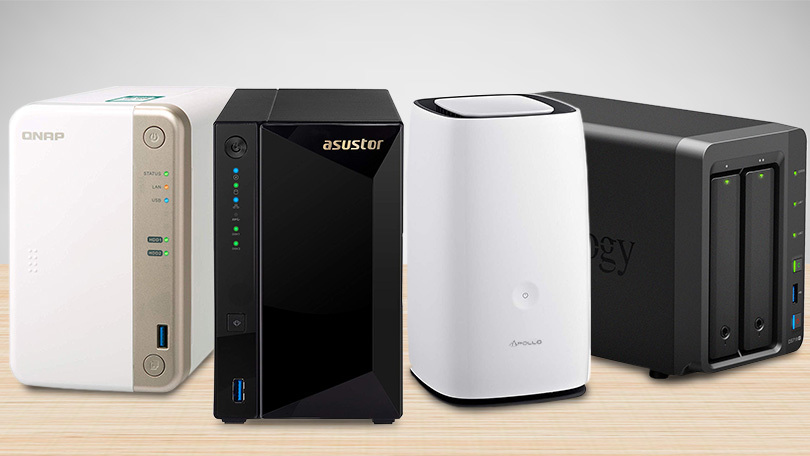
Buying network storage used to be a choice between two operating systems. Now there is a third option nobody expected: hardware from companies that were selling cables five years ago, at prices the incumbents cannot match. That has made the decision genuinely harder. My overall pick is the Synology DS425+ Four Bay Diskless NAS Enclosure, on software rather than specification.
Ten units below, ranked on the operating system first and hardware second, because the software is what you use every day. Worth knowing before you start: none of these prices include drives, and the current Synology models are fussy about which ones you fit.

- Storage software: The most complete storage operating system anyone currently ships
- Bay count: Four hot-swap bays plus two M.2 slots for a caching tier
- Network speed: Two multi-gig ports that can be bonded for extra throughput
- Backup tooling: Backup tooling covers PCs, phones and cloud accounts without licences
- Everyday noise: Quiet enough to live in a room somebody works in every day
- Mobile apps: The Photos and Drive apps genuinely replace the services they copy
- Drive lock: Restricts which drives it accepts, which raises total cost

- Storage software: Software has improved from unusable to genuinely fine in two years
- Bay count: Four bays and two M.2 slots, all of which count as usable storage
- Network speed: A ten-gigabit port as standard, which nothing else here manages
- Backup tooling: Backup and phone sync work without a subscription of any kind
- Everyday noise: Runs quietly for a four-bay unit with this much processor in it
- Mobile apps: Phone apps are good, and improving faster than anyone expected
- Track record: A young platform, so long-term update history is unproven

- Storage software: The same operating system and app catalogue as the larger models
- Bay count: Two bays, which is the minimum for a mirrored pair of drives
- Network speed: Two multi-gig ports on an entry-level unit is unusually generous
- Backup tooling: Backup tooling and photo indexing are identical to the four-bay unit
- Everyday noise: Quiet and small enough to sit on a bookshelf in a living room
- Drive lock: Same restriction on drive brands as its larger sibling

- Storage software: The software is far better than its reputation from a few years ago
- Bay count: Four bays with no restriction whatsoever on which drives you fit
- Network speed: A multi-gig port at a price where gigabit is still common
- Backup tooling: Backup apps cover the basics competently without any licence fees
- Everyday noise: Reasonably quiet, though the fan is audible in a silent room
- App catalogue: A smaller app selection than the two established platforms offer

- Storage software: A mature operating system with the deepest app catalogue after Synology
- Bay count: Four bays plus two M.2 slots and, unusually, a free PCIe slot
- Network speed: Two multi-gig ports, and the PCIe slot can take a ten-gigabit card
- Backup tooling: Backup and sync tooling is thorough if slightly awkward to configure
- Everyday noise: Fan noise is moderate, and the fan curve can be adjusted manually
- Interface: Administration screens are dense and take a while to learn properly
- Security record: A history of vulnerability reports means prompt updates really matter

- Storage software: A competent operating system with a decent, if narrower, app catalogue
- Bay count: Four drive bays alongside four M.2 slots, which is rare at this price
- Network speed: Two multi-gig ports that bond cleanly for a busier household
- Backup tooling: Backup tooling is straightforward and handles phones without fuss
- Brand reach: A smaller community, so fewer guides exist when something breaks

- Storage software: Modern software on a unit costing barely more than a bare enclosure
- Bay count: Two bays, enough for a mirrored pair holding photos and documents
- Network speed: A multi-gig port at a price point where gigabit is the norm
- Backup tooling: Phone photo backup is the headline feature and it works properly
- Everyday noise: Low power draw and very little noise in ordinary operation
- Processor: Modest processor, so media transcoding is off the table
- Fixed RAM: Memory is soldered in place and cannot be expanded later
- Storage software: Full operating system rather than a cut-down version for the entry tier
- Bay count: Two bays in a metal chassis that feels sturdier than the price implies
- Network speed: Gigabit networking only, which is the obvious saving at this level
- Backup tooling: Photo management and backup sync are the same apps the big units run
- Gigabit only: No multi-gig port at all, so large transfers stay slow
- ARM processor: No hardware transcoding, and container support is fairly limited
- Small RAM: Two gigabytes of fixed memory limits how much you can run

- Storage software: Ships ready for third-party storage systems rather than a locked platform
- Bay count: Six flash bays and no mechanical drives anywhere in the chassis
- Network speed: A ten-gigabit port, which flash storage can actually saturate
- Backup tooling: Backup handling depends on the system you install, so you choose
- Cost per terabyte: Flash storage costs far more per terabyte than disks
- Setup effort: Expects you to install and configure the system yourself
- Capacity ceiling: Total capacity is limited next to a four-bay disk unit

- Storage software: The same operating system Asustor puts on its more expensive machines
- Bay count: Four bays at a price nothing else on this list comes close to
- Network speed: A multi-gig port, which is generous for this end of the market
- Backup tooling: Backup tooling is basic but reliable for scheduled folder copies
- No transcoding: The ARM processor rules out any hardware video transcoding at all
- One gig RAM: A single gigabyte of memory, which limits containers severely
The Ten Units, Ranked
Ranked on operating system and app catalogue first, then bays, network ports and transcoding. Raw specification alone decides very little here.
#1 · Editor's Choice
Synology DS425+ Four Bay Diskless NAS Enclosure
Software is the whole argument for Synology, and it holds up. Photos recognises faces locally, Drive syncs a laptop without a subscription, and the backup suite covers machines a small office would otherwise pay for.None of the newcomers match that yet. What you pay is a restriction on drives: the current generation wants Synology-branded disks, which costs real money once you fill four bays. That is a genuine limit, though, and it is worth pricing before you commit. The software still makes it my default recommendation for a household.
The verdict: Still the best software in storage, with a drive bill attached.
#2 · Runner-Up
Ugreen NASync DXP4800 Plus Four Bay NAS
Two years ago I would not have suggested this. The hardware was strong and the software was a liability, which is a bad trade when the software is what you touch daily. Ugreen has closed most of that gap.What you get now is a Pentium processor, eight gigabytes of memory and a ten-gigabit port for less than a four-bay Synology costs before drives. There is no drive restriction either, and it will boot a third-party system if you prefer. The remaining doubt is longevity: nobody knows yet how long these updates will keep coming.
The verdict: Far more hardware for the money, with a shorter history behind it.
#3 · Best For Beginners
Synology DS225+ Two Bay Diskless NAS Enclosure
Most first purchases are overbought. People buy four bays, fill two, and then discover the thing they actually wanted was automatic phone backup and a shared folder. Two bays does that perfectly.Because the software is identical to the model at the top, nothing is missing except capacity. It is small, quiet, and setup asks very little of you. The same drive restriction applies, though, so factor that in. If a mirrored pair covers your photos and documents, start here.
The verdict: The right first unit, provided you accept the drive rules.
#4 · Best Value
TerraMaster F4-425 Four Bay Diskless NAS Enclosure
TerraMaster spent years being the brand you bought when the budget ran out, and the software deserved its reputation. That has changed enough to matter, and the hardware was always the strong part.Four bays, an x86 processor with hardware transcoding, upgradable memory and any drive you like, at a mid-market price. The app catalogue is thinner than Synology and the interface is dated, but Docker works and so does everything essential. It will also boot a third-party operating system if you outgrow the stock one.
The verdict: The most storage hardware for the outlay here, with software you can live with.
#5 · Best For Plex
Qnap TS-464 Four Bay Desktop NAS Enclosure
Hardware transcoding is the specific thing that makes a media server pleasant, and it is the reason this unit ranks where it does. The Celeron carries Intel Quick Sync, which converts video streams in dedicated silicon rather than burning the processor.A free PCIe slot at this size is close to unheard of, so a faster network card or extra flash can go in later. Against that, the interface is dense, and QNAP has had security incidents that make prompt updating more than good hygiene. Keep it patched and it is the best media server here.
The verdict: The one to buy for a media library, provided you keep it updated.
#6 · Best For Flash Tiers
Asustor AS5404T Nimbustor Four Bay NVMe NAS
Four spinning bays and four flash slots in one chassis is an unusual layout, and it turns out to be a useful one. Bulk storage goes on the disks, active projects go on the flash, and both live behind one address.Asustor is the quiet third platform, and the software sits between TerraMaster and QNAP for polish. Fewer people run it, which means fewer forum posts when something misbehaves. If the plan involves a fast working tier rather than pure capacity, no other unit here gives you this much flash expansion for the money.
The verdict: The flexible one, and the pick if you want fast and bulk storage together.
#7 · Best Budget
Ugreen NASync DH2300 Two Bay Desktop NAS
The cheapest way into network storage used to mean an old operating system and a phone app that barely worked. That is what makes this one interesting: entry-tier pricing, current software.Phone backup, shared folders, remote access without a subscription. For a household that wants photos off five phones and onto something they own, that is enough. The processor is modest and the memory fixed. Within those limits it is the best value here.
The verdict: Modern software at the bottom of the market, with modest hardware.
#8 · Cheapest QTS
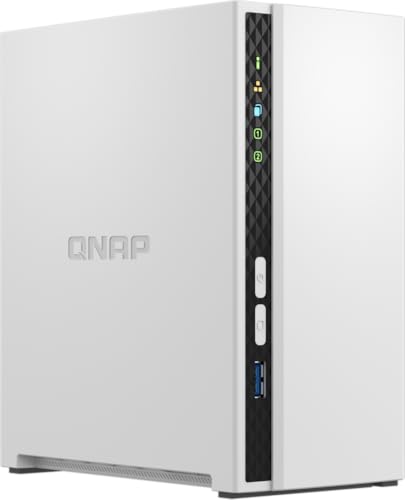
Qnap TS-233 Two Bay Desktop NAS Enclosure
Entry-level units usually run a reduced operating system, which is where the frustration starts. You buy in cheaply, then discover the app you wanted is only available on the tier above.QNAP does not do that here. You get the full software on modest hardware, which is a much better trade for a first unit. The limits are hardware limits: one gigabit port, an ARM processor with no transcoding, and two gigabytes of memory you cannot change. Buy it as a backup target and it is fine.
The verdict: The full software experience running on deliberately modest hardware, and cheap.
#9 · Quietest Pick
LincStation N2 Six Bay All Flash NAS Server
Every other unit here makes noise, because spinning disks make noise. In a cupboard that is irrelevant. In a bedroom, a studio or a small flat it is the reason the thing gets unplugged.Six flash bays and no platters means genuinely silent, and the ten-gigabit port is there because flash can actually fill it. The costs are real: flash is far dearer per terabyte, total capacity is lower, and you install the operating system yourself. For a machine that shares a room with you, I think the trade is worth making.
The verdict: Silent, fast and expensive per terabyte, which is exactly the trade.
#10 · Cheapest Four Bay
Asustor AS1204T Drivestor Four Bay Desktop NAS
Four bays at entry-level money is the headline here, and no other unit on this list comes close on that measure. The compromise arrives in the processor rather than the chassis.An ARM chip means no hardware transcoding and very little room for containers, so this is a file server and a backup target rather than a media server. Understood on those terms the value is excellent, and it runs the very same system as the pricier Asustor above. Buy it to hold data, not to work.
The verdict: Four bays at two-bay money, as long as you only need storage.
How We Tested and Scored These Storage Units
This ranking is research-led rather than a set of house bench runs. I worked from manufacturer specifications, live listing data and the published testing of independent labs, then ordered ten units on the properties that decide whether you enjoy owning one. Every unit was confirmed as a current, in-stock listing. Four candidates were dropped, either because the model has quietly left the market or because the only remaining listings were reseller markups at several times the sensible price.
- Operating system: the app catalogue, the backup suite and the photo tools, since this is the part you actually interact with daily.
- Bay count and expansion: drive bays, M.2 slots and any free expansion slot, which together set how long the unit stays useful.
- Network speed: whether the ports are gigabit or multi-gig, because a fast array behind a slow port is wasted money.
- Transcoding: whether the processor carries hardware video acceleration, which is the difference between a smooth media server and a stuttering one.
- Drive freedom: whether the manufacturer restricts which disks it accepts, and what that restriction does to the real cost.
- Noise and power: measured against where these units actually live, which is often a shelf in an occupied room.
Operating system and bay count carry the most weight, at roughly a third between them. Network speed and transcoding take about a quarter, with drive freedom, noise and power making up the rest. Processor specification is not scored on its own, since a fast chip behind poor software produces a worse experience than the reverse. No manufacturer had input into the order.
What to Look For in a NAS
Decide on bays before anything else, and be honest about it. Two bays holding a mirrored pair covers photos, documents and phone backups for a household, which is what most people actually want. Four bays makes sense when you are storing a media library, or when you want the flexibility to expand capacity without rebuilding the array. Buying four and filling two is common and mostly harmless, just more expensive than it needed to be.
Then look at the processor, because it decides one specific thing: whether video can be converted on the fly. An Intel chip with hardware acceleration handles several streams at once. An ARM chip handles none, and the media app quietly falls back to asking the client device to do the work. If a media server is the point of the purchase, that single distinction matters more than any other specification.
Check the drive policy before you commit. Some manufacturers now restrict which disks their units accept, and populating four bays with brand-specific drives can add meaningfully to the total. Nothing about that is hidden, but it is easy to miss when comparing the price of two empty enclosures. Work out the full cost with drives in it, then compare.
Finally, remember what a mirrored array is for. It keeps you running when a disk dies. It does not protect you from a deleted folder, a ransomware event or a house fire, because all of those affect both copies at once. A second copy somewhere else remains necessary, and most of these units will handle that automatically once you tell them where to send it.
Who Needs Which Storage Unit
For a household that wants photos off phones and files in one place, the Synology DS425+ is still the answer, because the software does the most with the least effort. If the drive restriction bothers you, and it reasonably might, the Ugreen gives you more hardware and any disk you like for similar money. Both are sound choices and the decision really is that simple.
Budget-led buyers have unusually good options now. The TerraMaster gives you four bays and a proper x86 processor for less than a two-bay Synology, and the Ugreen DH2300 runs modern software for barely more than an empty enclosure. Neither was true a few years ago. The cheapest four-bay unit here, the Asustor Drivestor, works well provided you only need it to hold files.
Media servers point at the QNAP, whose Quick Sync transcoding and free expansion slot make it the most future-proof choice for a library. If your storage lives in a room somebody sleeps in, the LincStation is the only silent option here, and I would pay the flash premium for that in a small flat. Anyone wanting a fast working tier alongside bulk capacity should look at the Asustor Nimbustor and its four flash slots.
Starting from nothing and unsure? Take the Synology DS225+. Two bays, the best software, and small enough to sit on a shelf. It is the unit least likely to end up unused in a cupboard, which is the real failure mode in this category.
Test Results
| Product | Bays | Processor | Network | Drive freedom | Best for |
|---|---|---|---|---|---|
| Synology DS425+ Four Bay Diskless NAS Enclosure | 4 hot swap | Intel quad core | 2 x 2.5 Gigabit | Restricted | Households |
| Ugreen NASync DXP4800 Plus Four Bay NAS | 4 plus 2 M.2 | Intel Pentium Gold | 10 Gigabit | Open | Value builds |
| Synology DS225+ Two Bay Diskless NAS Enclosure | 2 hot swap | Intel quad core | 2 x 2.5 Gigabit | Restricted | First purchase |
| TerraMaster F4-425 Four Bay Diskless NAS Enclosure | 4 | Intel x86 quad core | 2.5 Gigabit | Open | Best value |
| Qnap TS-464 Four Bay Desktop NAS Enclosure | 4 plus 2 M.2 | Intel Celeron | 2 x 2.5 Gigabit | Open | Media servers |
| Asustor AS5404T Nimbustor Four Bay NVMe NAS | 4 plus 4 M.2 | Intel quad core | 2 x 2.5 Gigabit | Open | Flash tiers |
| Ugreen NASync DH2300 Two Bay Desktop NAS | 2 | Quad core | 2.5 Gigabit | Open | Photo backup |
| Qnap TS-233 Two Bay Desktop NAS Enclosure | 2 | ARM quad core | Gigabit | Open | Backup targets |
| LincStation N2 Six Bay All Flash NAS Server | 6 M.2 flash | Intel N100 | 10 Gigabit | Open | Quiet rooms |
| Asustor AS1204T Drivestor Four Bay Desktop NAS | 4 | ARM quad core | 2.5 Gigabit | Open | Cheap capacity |
Frequently Asked Questions
What is a NAS and do I actually need one
It is a small computer full of hard drives that everything on your network can reach. Whether you need one depends on how much you dislike paying monthly for cloud storage, and whether you want photos and documents somewhere you own. For a household with several phones, it usually pays for itself within a couple of years.
How many bays do I need on a NAS
Two bays covers most households comfortably. That gives you a mirrored pair, so one disk can fail without losing anything, and it holds far more than a phone ever will. Four bays makes sense for a media library or where capacity needs to grow later without rebuilding the array from scratch.
Can a NAS replace cloud storage
It replaces the storage part, not the sharing part. Files live at home instead of on somebody else's server, which is cheaper over time and better for privacy. What you lose is the automatic off-site copy, so most owners end up backing the unit up to a cloud service anyway, just far less of it.
Do I need special hard drives for a NAS
Not strictly, but drives sold for this purpose are worth the small premium. They are rated for continuous operation and handle vibration from neighbouring disks better than desktop drives do. The more important question is whether your chosen unit restricts brands, because some current models do.
Does Synology require its own drives
The current plus-series models do check, yes. They accept a published list of compatible disks, and third-party drives may be refused or flagged. It is not hidden, but it changes the total cost noticeably once four bays are involved. Price the drives before deciding between platforms.
How much power does a NAS use
Less than most people expect. A two-bay unit with disks spinning typically draws about as much as a bright light bulb, and four-bay units are not dramatically worse. Both spin their disks down when idle. Flash-based units draw considerably less again, which is part of what you get for the higher price.
The Bottom Line
The Synology DS425+ is where I would send most people, because the software turns a box of disks into something a household will actually use. The Ugreen alternative is the better hardware purchase, and if the drive restriction irritates you then it is the right call instead.
Below those two, the market has genuinely opened up. TerraMaster and Asustor both sell serious four-bay hardware at prices the incumbents cannot reach, and the flash unit here solves a noise problem nothing else on this page addresses. Decide on bays and transcoding first, then let the software preference settle it.
As an Amazon Associate I earn from qualifying purchases. See our affiliate disclosure for details. Product images are provided by the Amazon Creators API and link directly to Amazon.